How to Swap Tokens on Fogo with Valiant
Jan 16, 2026
One thing before we start: Make sure you're signed up for Fogo's Season 2 Airdrop. Join here.
Swapping on Fogo takes seconds, this is the fastest way to go from FOGO to USDC without overthinking it.
Getting Started
Head over to valiant.trade to start trading. You can connect using Nightly, Solflare, Phantom, or Backpack wallets.
We recommend Nightly because it displays all your Fogo assets directly in the wallet interface. Backpack also shows your assets within the app. Solflare and Phantom will connect fine, but won't display your tokens in the UI.
To see all available apps in the Fogo ecosystem, scroll to the bottom of the page and click Apps.
Connecting Your Wallet
Click Sign In and select your wallet. Approve the connection, then approve the session transaction. You're now ready to trade.
Making Your First Swap
Trading on Valiant is incredibly fast. Simply:
Select the token you want to sell (e.g., FOGO)
Select the token you want to receive (e.g., USDC)
Enter the amount
Click Trade
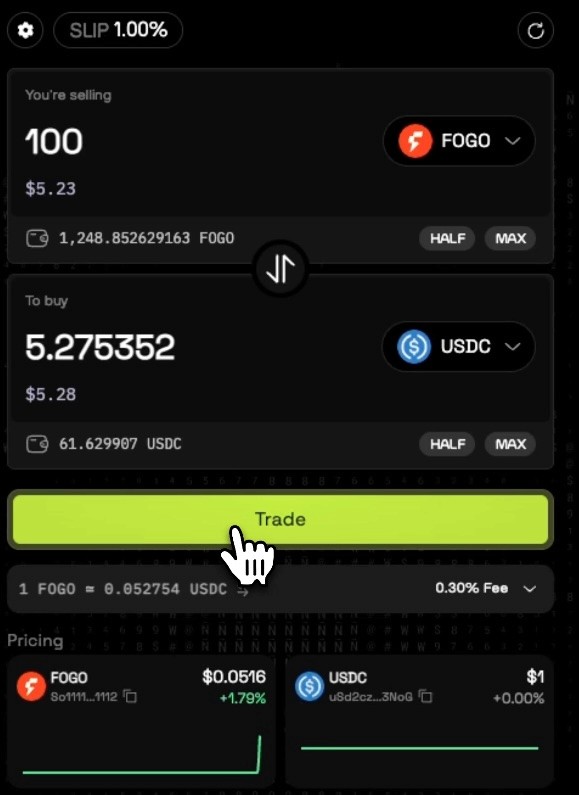
That's it. The transaction executes almost instantly.
Use the button in the middle to reverse the swap direction. Click on either token to select from other ecosystem tokens. Since Fogo is still early, the token selection is growing, but you'll find tokens like SOL (bridged via Wormhole), USDC, and others.
Where to See Your Tokens
After a swap, your tokens will appear in your wallet. With Nightly, you'll see them immediately in the wallet UI. With Backpack, they'll show in the app interface. If you're using Soulflare or Phantom, you can still view your tokens within the Sessions area of the dApp, though they may display differently in the early days (showing contract addresses instead of token names).
Understanding Slippage
At the top of the swap interface, you'll find the slippage setting. Slippage determines how much price movement you'll tolerate for your trade to still execute.
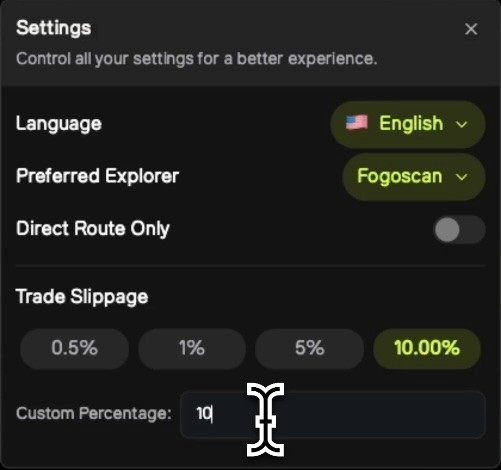
When to adjust slippage:
New tokens or tokens with low liquidity may require higher slippage to execute
Setting slippage too high (5%, 10%, 20%) means you could receive significantly fewer tokens than expected
Recommended settings:
0.5% to 1% is standard for most trades
Keep it as low as possible while still allowing your trades to go through
If a trade fails due to slippage, try increasing it slightly. On Fogo, most trades execute smoothly at 0.5% or even lower thanks to the speed of the network.
Help us on our mission
If this information was useful, you can support us by staking with our validator. Earn yield while helping us produce more content like this for the community.
And… don’t miss Season 2 Airdrop. Sign up here and start earning flames.
Want a visual walkthrough? The video below covers this topic in detail.
Need Help with Fogo?
We've created a library of different tutorials on navigating the Fogo blockchain. Be sure to check out our blog posts for more.
Not much of a reader? We have a YouTube playlist showing this tutorial and many others.
Disclaimer: This content is for educational purposes only and is not financial advice. Always do your own research before making any investment decisions.