Fogo Sessions Explained (Trade Without Re-Approving Every Time)
Jan 15, 2026
Before we jump in, make sure you’ve joined Fogo’s Season 2 Airdrop. Start here. Then keep reading.
If wallet pop-ups slow you down, Fogo Sessions let you approve once and trade freely for the entire session.
This is a short guide on how to use Fogo Sessions so you don't have to approve every single transaction.
What Are Fogo Sessions?
With Fogo Sessions, approving every transaction is a thing of the past. Instead of confirming each swap or trade individually, you approve a session once and can then execute multiple transactions seamlessly within that time window.
Wallet Compatibility
Fogo Sessions works with all Solana-compatible wallets, including Phantom, Solflare, and Nightly. We recommend Nightly because it displays all your Fogo tokens directly in the wallet interface. However, if you already use Phantom or Solflare, you can still connect and use Sessions without any issues.
Setting Up a Session
In this example, we're using valiant.trade, but the process is similar across other Fogo dApps.
Go to the dApp (e.g., valiant.trade) and click Sign In
Connect your wallet
You'll see the Sessions setup screen
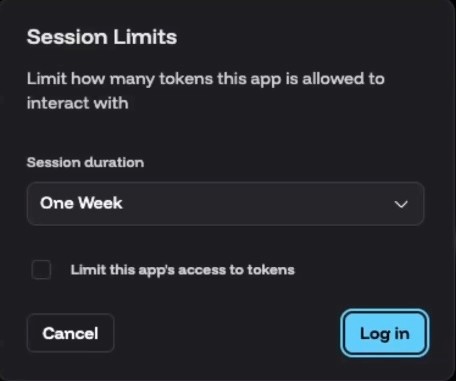
Here you'll configure two key settings:
Session Duration: Choose how long you want your session to last. Options include 30 seconds and other time intervals. Once your session expires, you'll need to approve a new one to continue trading.
Token Access: Make sure you allow the app to trade your tokens. If you toggle this off, your trades won't go through even with an active session.
Once configured, approve the session in your wallet. You're now ready to trade without constant pop-ups.
Trading with Sessions
With an active session, you can swap tokens instantly. No approval pop-up, no waiting. Just click trade and it executes.
When your session expires, simply click Extend Session, approve it once in your wallet, and you're back to seamless trading.
You can also modify your session settings at any time by clicking the Session button in the dApp interface.
Gasless Transactions
One of the best features of Sessions is that you can transact without holding any FOGO for gas fees. Most Fogo dApps will cover the transaction fees for you. This means you can start trading immediately, even if you only have USDC or other tokens in your wallet.
Managing Tokens Within Sessions
While in a session, click on Tokens to view your holdings. From here you can:
Send tokens to another address
Receive tokens to your wallet
Transfer in USDC from Solana
Transfer out USDC from Fogo to Solana
All of this is accessible directly within the Sessions interface.
Help us on our mission
If this information was useful, you can support us by staking with our validator. Earn yield while helping us produce more content like this for the community.
And… don’t miss Season 2 Airdrop. Sign up here and start earning flames.
Want a visual walkthrough? The video below covers this topic in detail.
Need Help with Fogo?
We've created a library of different tutorials on navigating the Fogo blockchain. Be sure to check out our blog posts for more.
In addition, we have a YouTube playlist showing this tutorial and many others.
Disclaimer: This content is for educational purposes only and is not financial advice. Always do your own research before making any investment decisions.